Notifications on Adult AI Apps
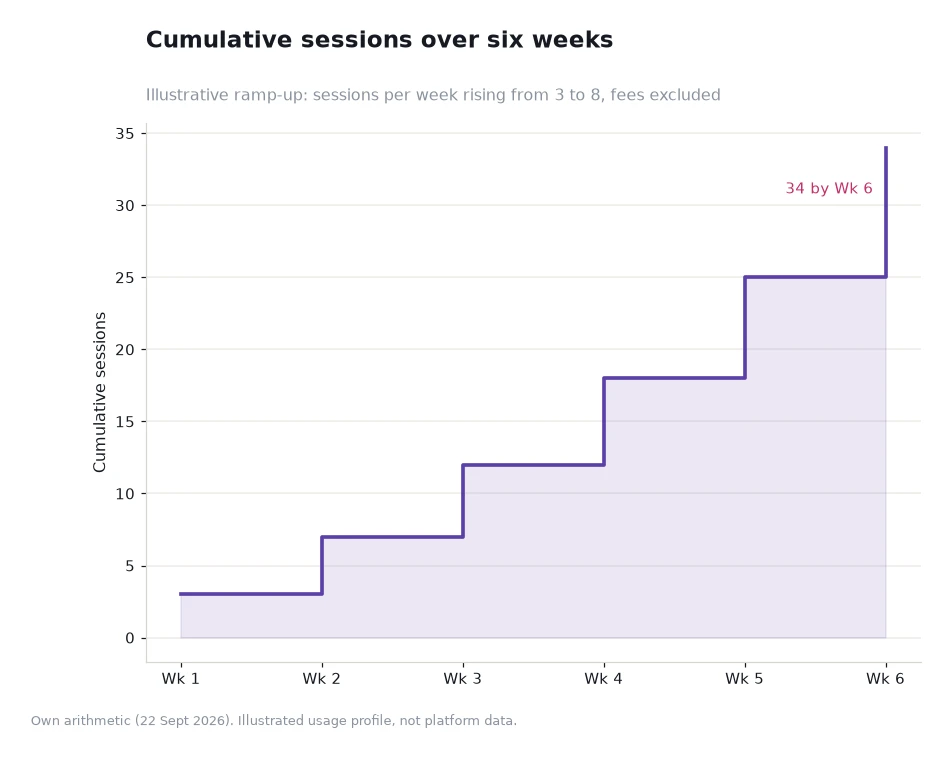
Notification settings decide how much of an adults-only chat habit is visible to the people around you, and the default is rarely the discreet option. Crushon runs on the web plus an iOS app and an Android build, and every platform that hosts an app wants to notify you about it. Count the exposure: a six-week ramp of 3, 7, 12, 18, 25 and 34 cumulative sessions produces 34 separate moments when an alert could have landed on a lock screen.

Key takeaways
- Turn previews off before anything else. A notification naming a character tells a third party more than the conversation does.
- Expect at least one alert per session, which means 34 alerts across a six-week ramp of 34 sessions.
- Silent or badge-only settings preserve the ability to find the app without printing its contents.
- Re-check notification permissions after any app update, since prompts and defaults can be reset.
What a chat notification is actually for
The purpose of a notification is re-engagement: a nudge to come back. On a platform whose sessions are entirely on demand, that nudge has no functional value, because there is no appointment to keep and no reply from another person waiting. The alert exists to raise your usage, not to inform you of anything you needed.
That makes the settings decision unusually simple. If the alert adds nothing to your use of the platform and adds something to your exposure, the default should be the quietest option that still lets you find the app. Most people leave the default in place, which is why notification previews remain the most common avoidable leak on platforms like this.
There is a second, subtler effect. Constant alerts fragment attention: a session interrupted three times is not one twenty-minute session but three short ones, and short sessions work worse with any conversational system that benefits from continuity. Turning alerts down improves both discretion and the experience, which is a rare combination.
A three-step notification setup
The whole configuration takes about two minutes and needs revisiting only after an app update or a device change. Work through the three steps in order, because each one covers a different surface.
| Surface | Discreet setting | Why it matters | Check after |
|---|---|---|---|
| Lock-screen previews | Off, so no text appears on a locked screen | The locked screen is the one surface others see most often | Every OS update |
| Banner and sound alerts | Silent, or badge-only with no banner | A banner appears while you are using another app in company | Every app update |
| In-app and email nudges | Reduced to account-level messages only | Promotional nudges leave traces in inboxes and notification centres | Quarterly |
| Device-level do not disturb | A schedule for the hours you use the device socially | Covers every app rather than just this one | Once, then as needed |
Two rows in that table are the ones people miss. In-app nudges matter because a poorly timed one arrives in front of someone who has borrowed your phone to look something up, and a do-not-disturb schedule is the cheapest blanket protection available on any phone.
Worked example: how many alerts a ramp actually produces
Assume one alert per session, which is conservative: a re-engagement system usually fires more than that, and an app that sends a weekly digest adds one more. Take the sessions per week as 3, then 4, 5, 6, 7 and 9. The cumulative session count runs 3, 7, 12, 18, 25 and 34.
Now read the cumulative line as an alert count. By the end of week one there have been up to three alerts. By week two, seven. By week six, thirty-four, of which the last nine arrived in a single week. That final figure is the one to focus on: nine alerts in seven days is more than one a day on average, and every one of them is an opportunity for a preview to appear on a screen you are not looking at.
The arithmetic also shows why the first week is not the week to judge this. Three alerts in a week is easy to miss entirely; thirty-four over six weeks is a pattern, and it is the reason a two-minute settings change pays off for months. The session counts are the author's illustrative profile rather than platform measurement, and they exclude fees.
Setting it up on web, iOS and Android
Web browsers are the easiest surface to control: revoke notification permission for the site entirely, and the question stops coming up. Browser notifications are rarely useful for a chat platform, and revoking them removes an entire category of surprise. If you use the iOS app, the system settings are where previews are governed, and the interesting option is the one that hides content while keeping the app reachable.
On Android the same logic applies through the per-app notification channel settings, which allow banners to be suppressed while the app itself remains normal. The Android build is distributed outside the app store, which makes it worth checking settings after each manual update, since a reinstall can reset permissions. The platform's own page, https://crushon.ai/ai-porn-chat, describes what the apps do and how characters recall earlier interactions, and the AI chat blog covers app mechanics in more detail if you want the full picture before changing anything. If you would rather start from the catalogue side, the character search view shows how it is organised.
Then leave it alone and put one review date in the calendar: quarterly is enough, plus an extra check after any operating system upgrade. Notifications are one of the few settings where a two-minute change buys months of quiet, which makes them a poor thing to skip and a poor thing to over-manage.
Frequently asked questions
Should I turn notifications off completely?
For most readers, yes — silent with no previews. There is almost nothing a chat notification can tell you that you did not already intend to do, and the quietest setting is also the easiest to live with.
How do I hide previews but keep the app easy to find?
Use the badge-only option where it exists, or allow notifications while disabling content previews. The app stays visible as an icon while nothing about the conversation appears on screen.
Why did my notification settings change on their own?
App and operating system updates can reset permission prompts or introduce new channels with defaults enabled. Re-checking after each update takes seconds and prevents a surprise weeks later.
Does turning alerts off affect how characters behave?
No. Notifications are a surface for prompting you back, not part of the conversation itself. Memory and continuity work through the account rather than through alerts.
Two minutes, then never think about it again
Do the three steps now: previews off, banners silent, in-app nudges reduced. Add a do-not-disturb schedule if your phone does not already have one.
Then set a quarterly reminder and forget it. For a platform whose alerts add nothing to the experience, that is the whole job.
Data and sources: platform pages describing Porn Chat AI, the availability of web, iOS and Android builds and how characters recall earlier interactions, read from Crushon.AI on 22 Sept 2026[1]. Session counts are illustrative arithmetic by the author and exclude fees. For an audience of adults 18 and older.